
School Attendance Management System
Mark a whole class at once, keep reliable history, and review monthly reports for students, teachers and staff.
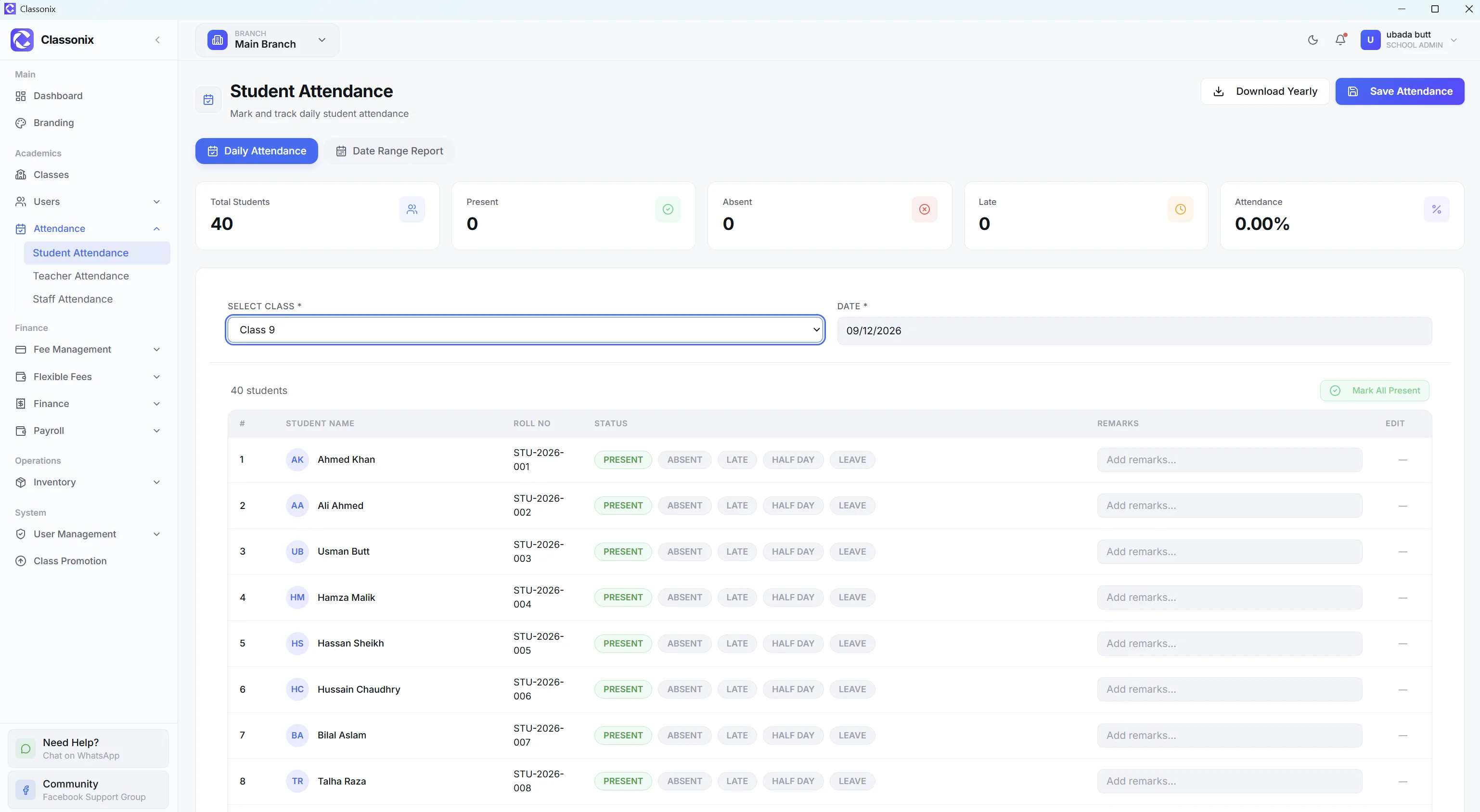
Attendance is a daily task, but it also becomes a monthly reporting problem when records live in paper registers. Teachers need a fast way to mark the class, management needs reliable history, and the school may need to review attendance by student, class, teacher or staff member. A register answers ‘who was marked’ but makes ‘how is this student doing this month’ a manual counting exercise.
ClassoNix provides separate attendance workflows for students, teachers and non-teaching staff. Student attendance can be marked by class and date, with statuses for present, absent, late, half-day and leave. The system provides monthly statistics and CSV export for student, teacher and staff attendance.
Mark Daily Attendance by Class
The student attendance screen lets the user select a class and date and mark the whole class at once. A single request supports up to 300 students and provides a “Mark all present” workflow so staff can adjust only the exceptions.
This is designed for daily speed without sacrificing the individual record. Each student receives one attendance record per day, and the system records who marked it.
The bulk workflow also keeps the daily habit cheap: marking is a routine two-minute task instead of a page-by-page exercise, which is what makes the data reliable enough to report on later.
Student, Teacher and Staff Attendance
ClassoNix does not limit attendance to students. The product covers three categories: student attendance, teacher attendance and staff attendance.
Student statuses include PRESENT, ABSENT, LATE, HALF_DAY and LEAVE. Teacher and staff attendance support PRESENT, ABSENT, LATE and LEAVE, with teacher and staff monthly reporting and CSV export. Teacher attendance also includes check-in/check-out times. The reports area provides per-student, per-class, per-teacher and per-staff statistics with monthly breakdowns.
Because the same status vocabulary applies across students and employees, management can compare attendance patterns across the whole institution instead of maintaining separate conventions for each group.
Monthly Reports Instead of Register Hunting
Attendance records become more valuable when they can be reviewed over time. ClassoNix provides monthly breakdowns and CSV exports for student, teacher and staff attendance.
For a school administrator, this means attendance can be reviewed as a structured dataset instead of manually counting marks in a register. It also creates a consistent history that can be viewed from the relevant student or employee context — see the student information system for how records connect.
WhatsApp as the Communication Layer
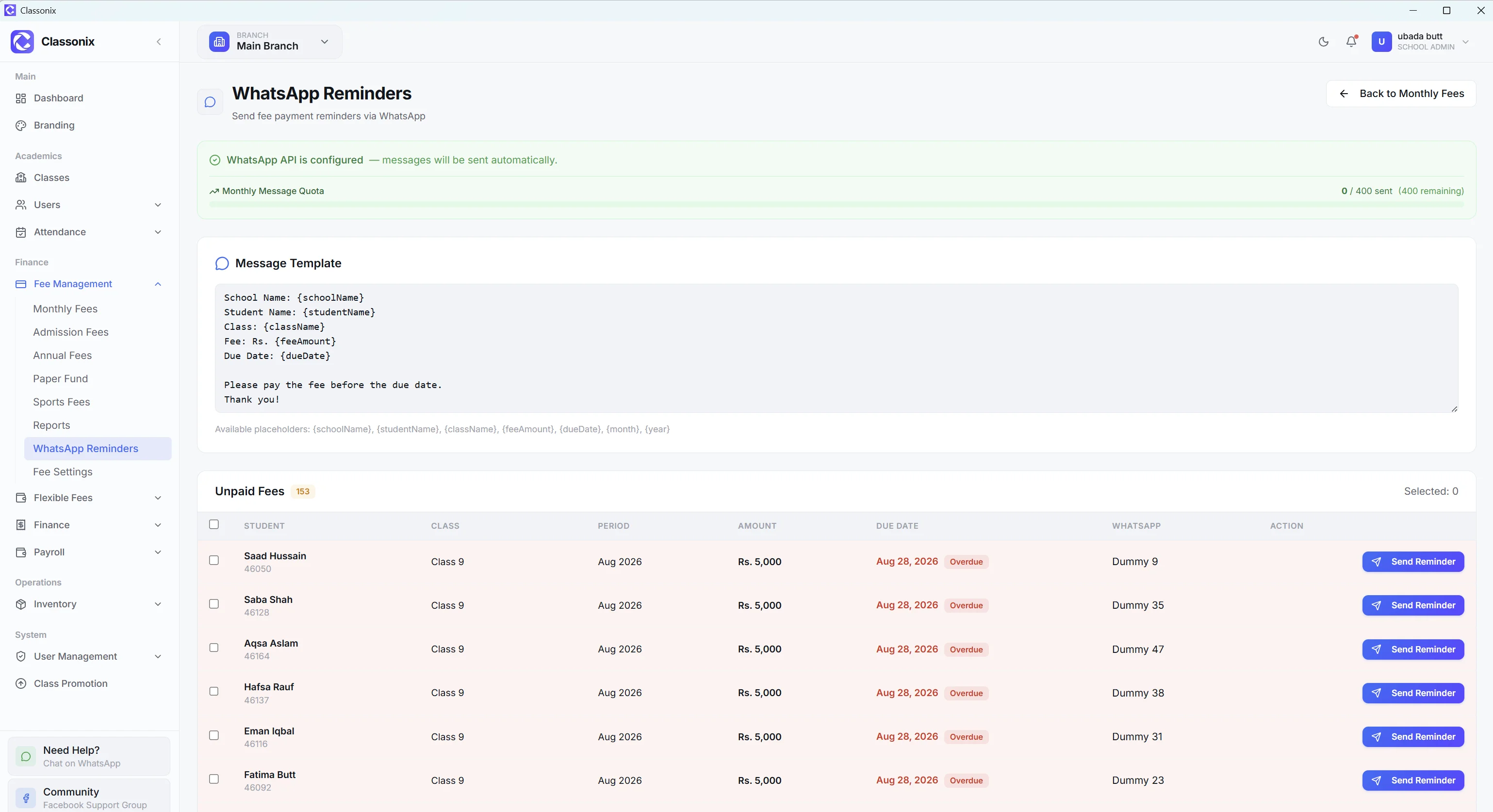
ClassoNix includes a WhatsApp reminder workflow connected to fee records, with delivery tracking through SENT, DELIVERED, READ and FAILED statuses. It provides the communication channel schools use to reach parents where they already are.
For attendance-related communication, schools can use the same WhatsApp messaging capability for follow-up where the corresponding feature is enabled — keeping parent communication inside the same platform as the rest of school operations — the WhatsApp contact field on the student record is the same one reminders already use, so no separate parent-contact list is maintained for attendance follow-up.
A Better Fit for Pakistani Schools
The value of attendance software is strongest when the school can use it alongside the rest of its operational records. ClassoNix connects student profiles with attendance history, while fees and other modules remain available within the same platform.
The system is also designed for branch-scoped operation, so attendance records follow the selected branch and the user’s permitted branch access — part of the wider school management system.
Attendance also connects to the same student profile used for fees and academics — a student’s attendance history lives on the same record a parent or teacher already knows to check. Monthly CSV exports give the office a shareable file for review meetings or records.
Related Features
See how the rest of the ClassoNix platform connects with this workflow.
Questions, Answered
Attendance workflows, statuses and reporting in ClassoNix.
ClassoNix is designed for bulk class marking: a user selects the class and date and can mark the whole class at once, then adjust individual exceptions. The exact time depends on class size rather than a fixed promise — the design goal is to make only the exceptions take effort — the absent and late cases get attention instead of every present student costing a click.
ClassoNix includes WhatsApp messaging with delivery tracking, which schools use for parent communication such as fee reminders. Attendance statuses are recorded per student; where WhatsApp-based parent communication is enabled, the same channel can support attendance follow-up.
Yes. ClassoNix has separate teacher and staff attendance workflows. Non-teaching staff can have daily attendance records, monthly reports and CSV export, alongside student and teacher attendance.
Yes. The attendance system provides monthly breakdowns and CSV exports for student, teacher and staff attendance — the same categories the marking screens cover, so nothing marked daily is missing from the monthly view. The reports area also supports per-student, per-class, per-teacher and per-staff attendance statistics.
Attendance Without Paper Registers
Mark, review and report attendance for students, teachers and staff — in minutes a day.
Free forever plan · No credit card required