
Student Information System
Every student record in one place — structured profiles, guardian details, attendance history, fee history and academic history.
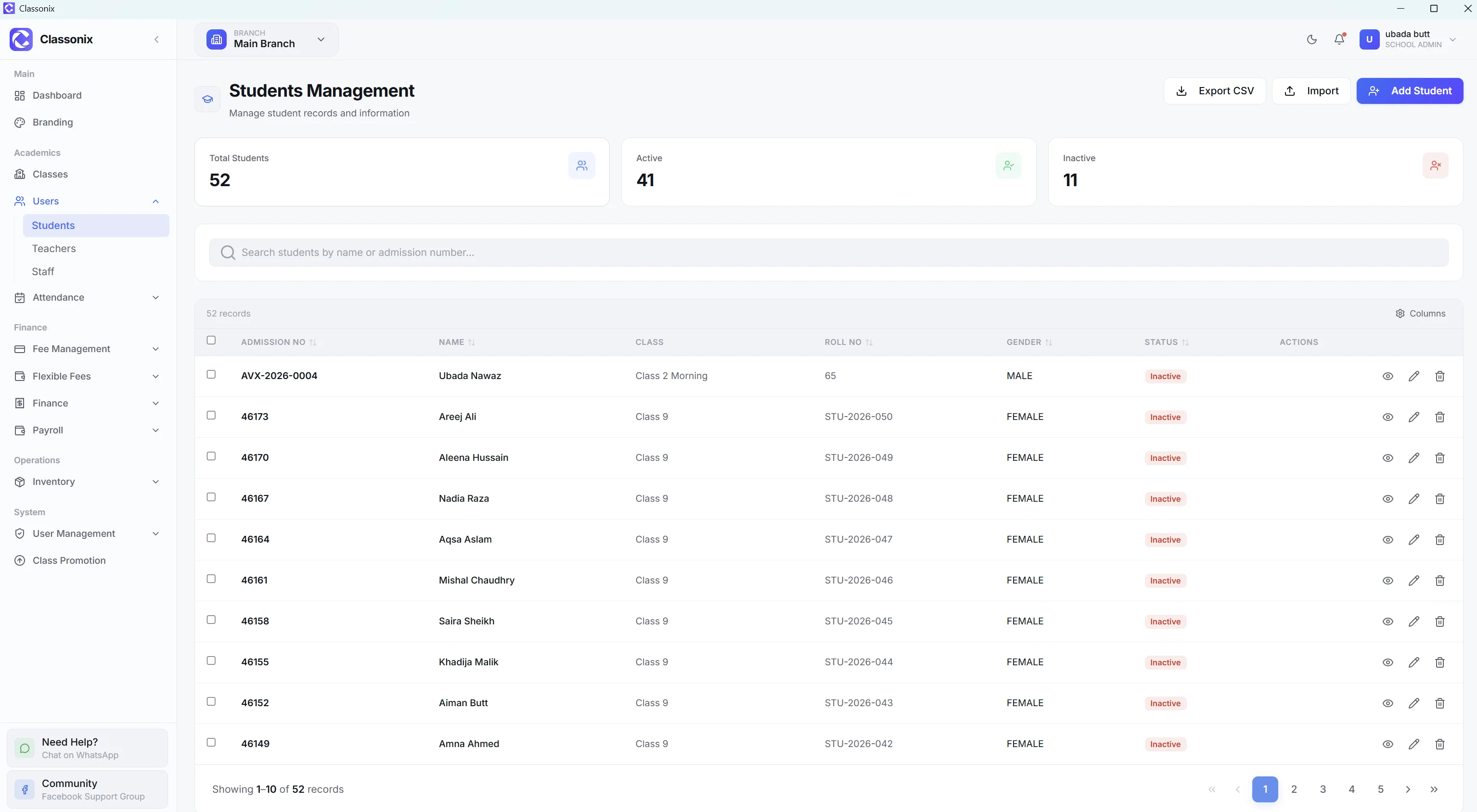
A student information system is the foundation of school administration because almost every daily workflow begins with a student record. The school needs to know who the student is, which class and section they belong to, how to contact their family, and what has happened across attendance, fees and academic history.
ClassoNix provides searchable student records with structured personal, academic, contact and additional information. Student detail pages include attendance history, fee history, flexible-fee information where applicable, and academic history. The system also supports Excel import and controlled student deactivation so records can be managed without immediately losing historical information.
That foundation matters because every other module reads from it — attendance is marked against students, fee vouchers are generated for them, and reminders go to the guardian numbers stored on the same profile.
A Complete Student Profile
ClassoNix student records can include admission number, roll number, name, date of birth, gender, WhatsApp number, class and section, blood group, address, city, transport route, medical information, emergency contact and guardian information. A photo can also be uploaded.
The result is a structured student record rather than a name in a simple list. Fields like blood group, medical information and transport route exist because schools actually record them — the profile is designed for real office use, not a minimal contact entry, and it stays editable as circumstances change. Search and filtering make the active student population easier to manage, while the detail page brings related history into one view.
Admission-to-Promotion History
ClassoNix keeps a student’s operational history connected to the student record. The detail page covers attendance history, fee history, flexible-fee information where applicable, and academic history with an exam summary and marks table.
The product also supports academic-year progression through class promotion, so the same student record can remain the reference point as the student moves through the school’s operational cycle.
This continuity is what separates a student information system from a yearly register: last year’s attendance, fee and academic data remain attached when the student is promoted, instead of being archived in a new file.
Import Existing Student Records
Schools do not have to start by typing every existing record individually. ClassoNix provides an Excel import workflow with a pre-formatted template. The school downloads the template, fills it, uploads it and receives an import summary showing successful and failed rows.
Duplicate admission numbers are rejected, and imported students are assigned to the current branch. This makes the migration process more controlled than copying data manually between spreadsheets.
Search, Filters and Student History
The student list is paginated and supports server-side search by name, admission number and roll number. It also provides total, active and inactive statistics and a filter for active versus deactivated students.
On the detail page, attendance history includes percentages and monthly breakdowns. Fee history shows fee records, statuses, paid and pending amounts and payment dates. Academic history includes an exam summary and marks table — a broader view without opening multiple disconnected systems.
For the front office this is the everyday payoff: a parent calls about a fee, an absence or a document, and the answer is on one screen instead of in three different registers.
Data Privacy Through Access Control
ClassoNix is multi-tenant: each API request is scoped to the school and branch, so schools cannot see each other’s data. Branch-level authorization further limits records to the branches a user is assigned to.
User management also includes role-based permissions and branch assignment. These are access-control features built into the platform — part of the wider school management system architecture.
Deactivation is deliberately separate from deletion: a student who leaves keeps their history in the system, so past attendance and fee records remain auditable while the active list stays clean.
Related Features
See how the rest of the ClassoNix platform connects with this workflow.
Questions, Answered
What the student information system stores and how it connects.
ClassoNix can store structured student information including admission and roll numbers, name, date of birth, gender, WhatsApp number, class and section, contact and guardian details, address, emergency contact, photo and other fields.
Yes. ClassoNix provides an Excel import workflow with a pre-formatted template. Duplicate admission numbers are rejected, imported students go to the current branch, and the import process provides a succeeded-versus-failed summary so problem rows can be fixed and re-imported without touching the records that already went in cleanly.
The student detail page includes attendance history, fee history, flexible-fee history where applicable, and academic history with an exam summary and marks table. The product also supports class promotion across academic years.
Access is controlled by school and branch boundaries and by user permissions. Each school has isolated data, while branch-level authorization limits users to assigned branches. Role-based permissions can also control access to modules, so a front-desk user and a principal see only what their role requires.
One Record. Every Student.
Structured profiles, complete history and Excel import — the foundation of school administration.
Free forever plan · No credit card required