
School Inventory Management
Categories, items, allocations and class inventory — with a dashboard that flags low-stock items before they run out.
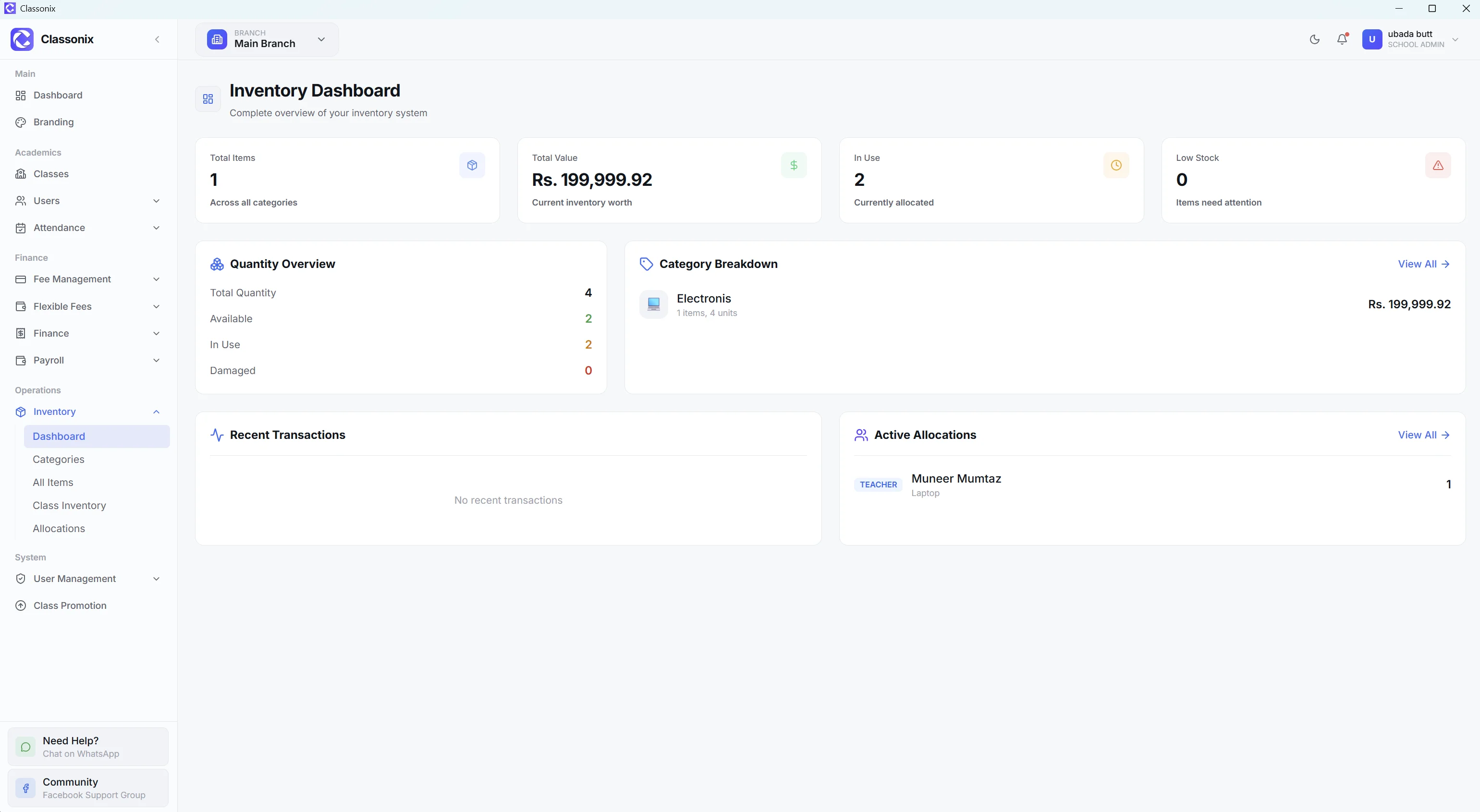
Schools manage more physical items than they often realize: books, uniforms, stationery, equipment and other assets move into storage, out to students or staff, and sometimes back again. When those movements are recorded in notebooks or scattered spreadsheets, it becomes difficult to know what is currently available and what happened to an item. The questions are simple — how many medium uniforms are left, who took the projector, did the books for class 4 ever arrive — but a notebook answers them slowly and unreliably, and it can never warn anyone before the last box runs out.
ClassoNix includes an inventory module with a dashboard, categories, items, class inventory and allocations. The dashboard can surface low-stock items and quantities. The inventory area is part of the broader school-management platform, alongside finance, staff and student records — the storeroom becomes another managed area of the school instead of a locked room only the caretaker understands.
Organize Inventory by Category
The inventory module includes categories and items, providing a structured way to organize school stock. Class inventory and allocations extend that structure into school operations.
Items live under categories so a book, a uniform size and a cleaning supply each sit in the right place — and adding a new item is a catalog entry, not a new column in someone’s spreadsheet. Because categories and items are ordinary records, the person maintaining stock does not need technical knowledge — the module behaves like the rest of the admin area. — with their own records rather than one undifferentiated list. Categories are flexible enough for a school’s real mix — uniforms, textbooks, stationery, lab equipment, sports gear and cleaning supplies can each sit under their own grouping with quantities tracked per item.
Allocate Items to Classes and Operations
Inventory becomes more useful when the school can connect physical items with the groups using them. ClassoNix provides allocations and class allocations — so the school can assign inventory to classes and operational areas — issues are recorded with the same care as stock, so ‘where did it go’ has an answer in the system.
The item detail view keeps the allocation records attached to each item, so management can review where stock went rather than relying on memory. When a class receives its book set or a department takes equipment, the allocation is logged against the item — the storeroom stops depending on one person’s recollection of who signed for what — and when that person is away, the records still answer.
See Low Stock Before It Becomes a Problem
The dashboard includes an inventory card showing low-stock items with quantities. This gives management an at-a-glance signal that an item may need attention — useful before the uniform-selling season or the start of term, when discovering a shortage late has a real cost — reordering uniforms or textbooks takes lead time, and the card exists precisely to create that lead time — a flagged item can be reordered while there is still stock to cover the gap — the difference between ordering in September and apologizing in October.
A low-stock view is more useful than waiting for someone to discover that a book, uniform size or supply has run out during daily operations.
Connect Inventory to School Operations
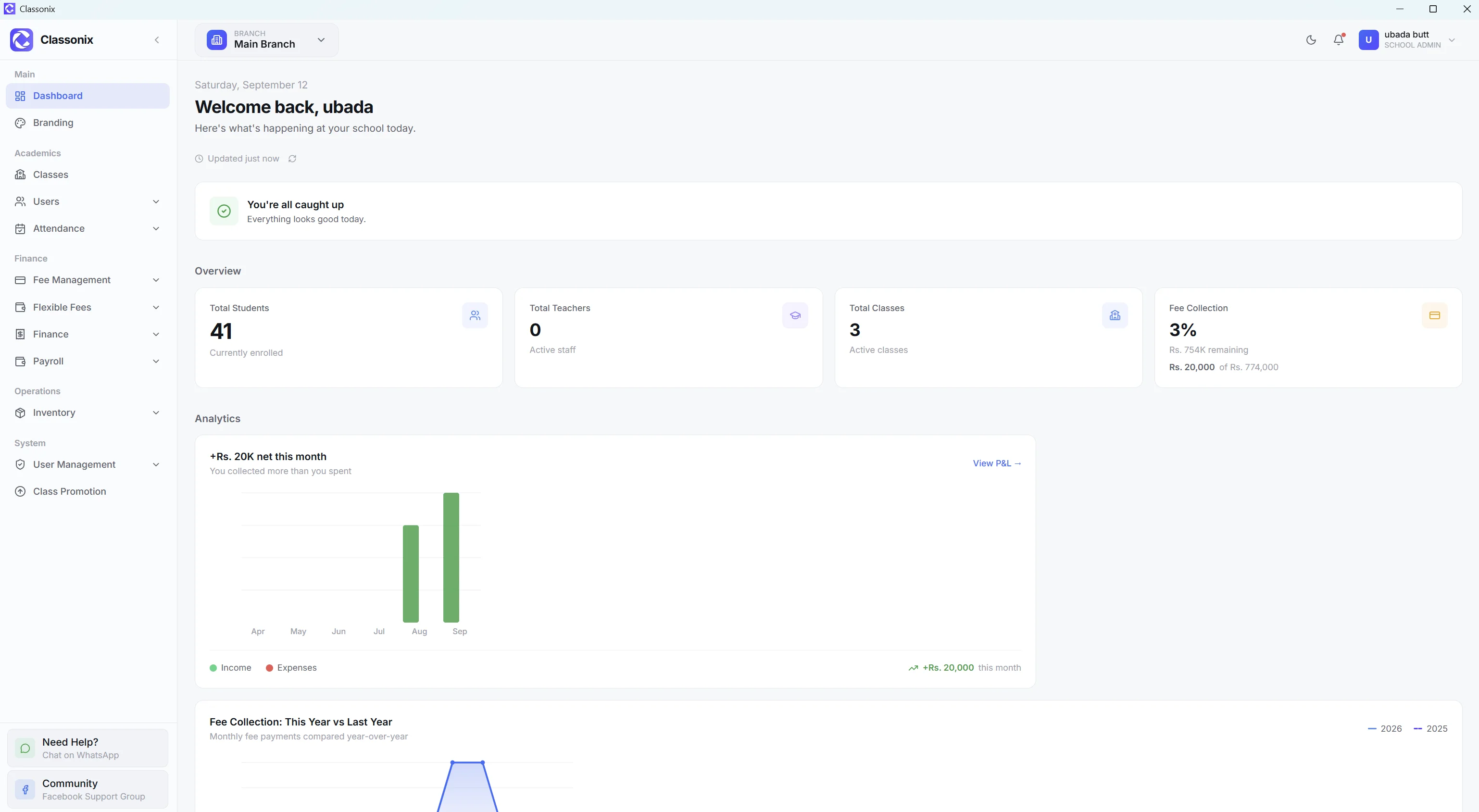
Inventory does not exist in isolation. The dashboard can show low-stock information alongside student, attendance, payroll and financial KPIs, while the wider platform provides staff and branch context.
For a multi-branch school, inventory is also branch-scoped — allocations and stock follow the selected branch, consistent with the rest of the multi-branch system. Each campus keeps its own inventory records, so one branch’s stock level never masquerades as another’s. For the owner, that means purchasing decisions can be made per campus from real quantities instead of a group-wide guess.
Related Features
See how the rest of the ClassoNix platform connects with this workflow.
Questions, Answered
What the inventory module covers in ClassoNix.
ClassoNix provides an inventory module with categories and items. Schools can organize their own inventory records; examples such as books, uniforms and stationery work as practical illustrations — there is no fixed built-in catalog.
Yes. The module provides allocations and class allocations for assigning inventory to classes and operational areas, with each issue recorded against the item for later review.
Yes. The inventory dashboard includes a low-stock card showing items with their current quantities.
Yes. The item detail view keeps the full allocation and transaction history attached to each item, so management can review where stock went and when — issues, allocations and adjustments all stay on the item’s own record, which is what makes an annual stock-take an hour of checking instead of a day of archaeology.
Know What You Have. Know Where It Went.
Categories, allocations and low-stock visibility — inside the same system as everything else.
Free forever plan · No credit card required